

The easiest & most convenient way to submit income tax return form is via e-Filing. Normally, e-Filing system start to open on 1st of March for previous year tax assessment. e-Filing system can be used to submit e-BE, e-B, e-M, e-E, e-P and e-M form.
For information, the dateline to complete e-BE and e-M income tax return is on 30th April while for e-B and e-P and e-M is on 30th June.
Below are simple guides on how to do e-Filing.
LHDN/IRB identified 4 main steps to do e-Filing as below,
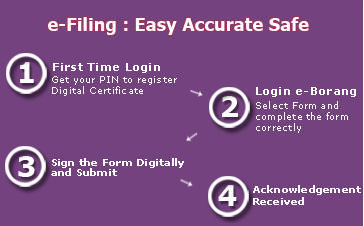
For first time user, you have to start from step 1, but if you do e-Filing previous year you can skip step 1 and go directly to step 2.
First Time User
For first time user, you have to obtain PIN number and register for e-Filing.
How to obtain for PIN number?
PIN number can be obtain from Tax Return Form, nearest LHDN branch, via mail, fax or e-mail.
You have to provide the following details and documents for PIN number application.
- Tax Reference Number
- Latest Address
- Copy of Identification Card (front and back)
- Telephone Number
- For application by email, send items 1-4 above to [email protected]
For application via e-mail, you have to use your own e-mail address as application for PIN number through third party e-mail will not be entertained.
How to Register for e-Filing?
- Once you received the PIN number, browse to e-Filing website.
- Click on “First Time Login” from the menu bar on the left.
- Fill in the PIN number & identification number.
- Click on “Submit” button to continue for certificate registration. You need to select your password and Challenge Phrase and its answer.
Recurring and First Time User who Successfully Registered
How to do e-Filing?
- Browse to e-Filing website.
- Click on “eForm Login” from the menu bar on the left.
- Select your the form that is applicable to you and continue to fill the form.
- You can fill the form partially and update it later by pressing the save button.
- If need more detail on in 2013 Individual Income Tax Exemptions, Deduction, Rates, Reliefs and Rebates click here.
- Once finish, sign the form digitally & acknowledge.
Congratulation!, you complete your e-Filing. For subsequent year tax return, you do not need to register again. Just remember your password and continue to complete the form only. (“How to do e-Filing?” section only)
Note: This post originally posted on 8th March 2010. It was modified on 23rd March 2011, to fit for 2010 Individual Income Tax Return.
I presume you attach a scanned copy of your ic (front and back)? How long does the LHDB+NM take to reply?
no, they have all your details in the system when you registering for e-Filing. They won’t reply you when submitted.
Hi, your post was very informative. i however have one simple question which wasnt detailed on your website nor the e-Hasil website.
I wish to know which category of employees or business owners fall under which of the following categories.
e-be, e-m, e-b, e-p
Assuming i were working in Malaysia for less than 3months and went to do the e-filling, which of the above category do i fall in?
Your kind response will be very much appreciated.
Thanks
I noticed my name in e-filing is wrong? how to resolve this ?
I hv been register new pin no. on 19/4/2013 but still no reply fr LHDN.. Can anyone advise ! thanks.
Hi, I am doing part time property negotiator, which category do i belong to? My friend advice i’m under own business.
Am i under OG right? This year, company issue CP 58 to me, am i still under OG? I am very confused.
Please advice.Thank You.