

Recently, CIMB Bank enable one of the most wanted features in CIMB Clicks, Instant Interbank Fund Transfer. As the name imply, the fund will be available immediately in the beneficiary account.
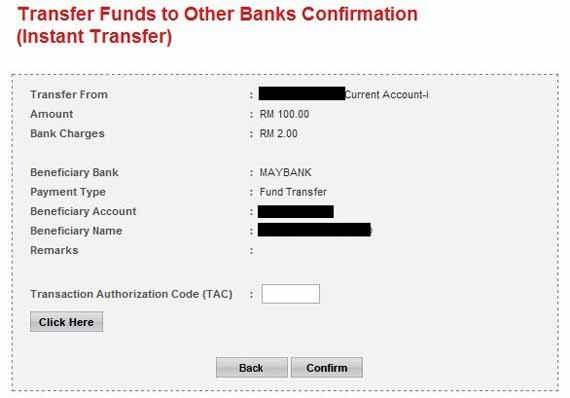
One of the best features is, upon keying in the beneficiary account number, the name of the account holder will be displayed. So you know the money is going to be received by right person.
You will be charged RM2.00 for one times instant transfer and RM4.00 for schedule instant transfer.
However, for the time being, the service is limited to certain banks and account types only. For details on kindly refer to list of Participating Banks.
Below is short explanation on how to do Instant Interbank Fund Transfer
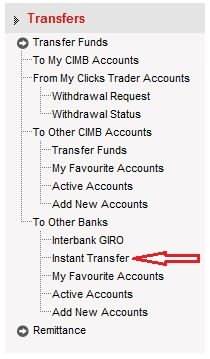
Step 1 – Click on Fund Transfer Menu & you will have the screen as below. Select Instant Transfer.
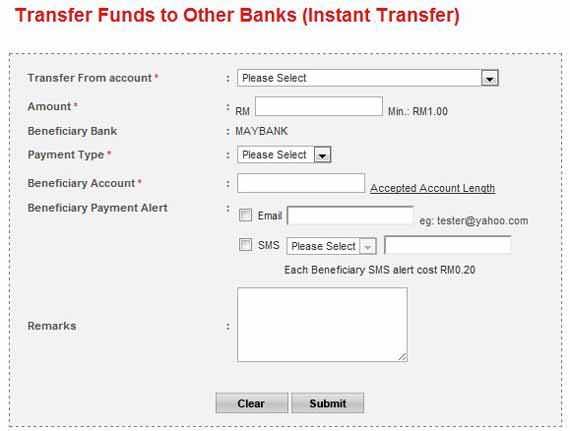
Step 2 – Key-in all the required details mark as (*) and click on submit button. Beneficiary name is not required.
Step 3 – Check all the details as per screenshot below. Confirm that the beneficiary name is correct prior to confirming the fund transfer. You have to apply for TAC to complete the transaction.
For more information, kindly browse to;
1. CIMBClicks Instant Transfer page.
2. List of Participating banks.
3. Fund Transfer FAQs.